
Setting up a Copilot Studio agent on Power BI
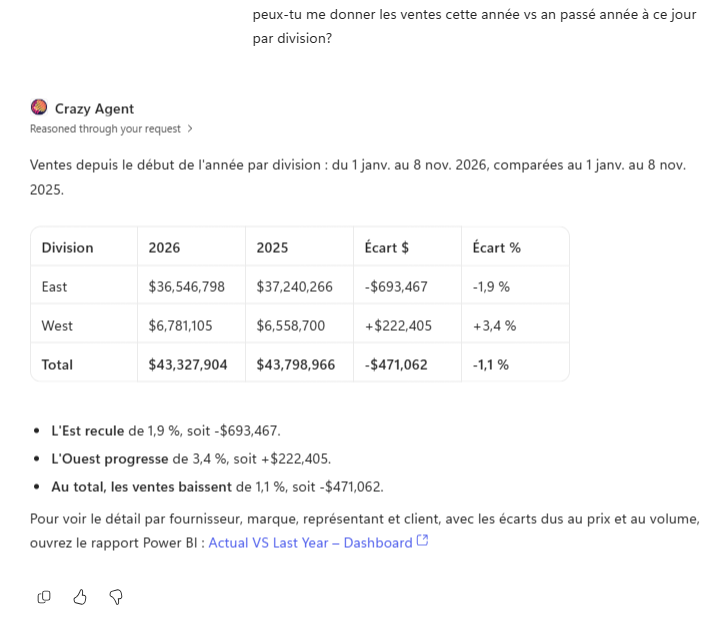
A Copilot Studio agent connected to a Power BI semantic model can answer “What were our sales last month by division, vs last year?” in seconds. But the quality of its answer depends on two things: the model you give it and how you configure it.
I recently built an agent like this for a distributor. It queries the model in DAX, respects row-level security (RLS) and points to the right Power BI report at the end of each answer. Here is what I configured, setting by setting, and why.
Step 0: a semantic model built for AI
An agent is never better than the model it queries. Rather than connecting the main model, I created a copy dedicated to AI, simpler and better documented.
Descriptions everywhere. Every visible table, column and measure has a plain-language description: what it calculates, its sign (costs are negative) and when to use it.
A searchable dictionary. A calculated table automatically pulls the model's descriptions (INFO.VIEW functions). When the agent is unsure, it searches this dictionary before writing its query, instead of making up a measure name.
A period selector. The TY, LY, Var $ and Var % measures follow a chosen scenario (Year to Date, Month Last Completed, Rolling 12 Months…). The agent doesn't write any date logic: it picks a scenario by name.
Technical columns hidden. Keys and raw numeric columns are hidden, so the agent goes through measures and never runs a SUM on a fact table.
RLS that doesn't lie. Sales reps can't see costs. Without care, gross margin would have shown them sales alone. So the measure checks whether cost rows are visible and returns blank otherwise. The agent can then say “cost is not available with your access.”
RLS still applies when the agent queries the model: each user only sees their own data, with nothing to add in Copilot Studio.
The agent settings, one by one
Model
This is the language model that reasons and writes the DAX. I chose the most capable one available. Generating a correct DAX query, with the right measure names and a period filter, takes more rigor than summarizing text. A lighter model makes more syntax errors.
Instructions
This is the heart of the agent, and the limit is 8,000 characters. So every sentence has to earn its place.
Mine cover six topics:
The role. “You are the sales analyst. You only answer with figures from a query. Never invent a number.”
The method. Identify the measure, the period, the grouping and the filters. When in doubt, search the dictionary. Write one query, test it, and only then send others.
The exact format of the tool call. Half the errors came from malformed JSON (one brace too many), not from the DAX. I describe the expected format and the error message that gives it away.
Periods. The exact list of scenarios, how common phrases map to them (“last month” = Month Last Completed) and the default period.
Business rules. Costs are negative, what a customer is, what “East” and “West” mean, always check a column's values before filtering, 25 rows maximum.
Answer style. The number first, the exact dates of each period (“October 1 to 31, 2026 vs October 1 to 31, 2025”, never just “YTD”), a short table beyond three rows and a single follow-up suggestion.
I add three or four sample DAX queries. One concrete example is worth three paragraphs of explanation.
Channels
Where users talk to the agent. I enabled Teams + Microsoft 365: sales reps ask their questions in Teams without opening Power BI. The agent answers under the user's identity, so RLS applies.
Tools
The actions the agent can run.
The semantic model query. This is the main tool: it runs a DAX query (EVALUATE …) on the published model and returns the result. I gave it a clear name (“Query sales model”) so the agent knows when to use it.
Work IQ. It gives access to the user's Microsoft 365 context (emails, files, meetings). Useful to prepare a customer visit, but the instructions forbid using it for business figures: only the model's numbers count.
Knowledge
The reference sources the agent consults for context, not for numbers.
The company website, to describe products and brands.
An Excel catalog of the Power BI reports: every page of every report, its description and its link in the app. The instructions ask the agent to suggest the right page at the end of an answer, taking the link from this file only. Users go from the quick answer to the full analysis in one click. Remove hidden pages and technical reports from the file, so the agent never suggests them.
Skills
Skills are specialized instructions the agent loads only when the question calls for them. They get around the 8,000-character limit: the main instructions stay general, and each use case has its own file, with a name and a description that say when to use it.
Examples: sales opportunities by customer, customer visit prep, vendor review, dead stock, replenishment, variance explanation (price, volume, mix), Excel export, charts and decks. Each skill has explicit default values (180 days without sales, $1,000 minimum…) that users can change in their question.
When part of the data is still being validated, I disable it in the skill rather than let the agent answer with questionable numbers.
Connected agents
This setting lets the agent hand off part of the work to other agents (for example, an HR or finance agent). I don't use it yet. One well-instructed agent is enough to start, and every added agent is one more place where an answer can go off the rails.
Test, evaluate, publish
The tabs at the top of Copilot Studio follow the agent's life cycle.
Preview. To test a question while you adjust the instructions. I always check the generated DAX query, not just the answer: a plausible number can come from the wrong measure.
Evaluate. To replay a list of typical questions after each change. I compare the answers with the numbers in a Power BI report. It's the only way to know whether a change to the instructions broke something else.
Publish. To make the new version available in the channels. Until you publish, users keep the old one.
Monitor. To see the real questions asked and the failed answers. It's the best source of ideas for the next skill.
I also test with an account for each security role. A sales rep should see their sales, but no margin.
What I took away
The semantic model does 80% of the work. Clear descriptions and a dictionary are worth more than any instruction.
Every character counts. With 8,000 characters, keep in the instructions what every question needs and move the rest into skills.
Exact dates build trust. A user who sees “October 1 to 31, 2026 vs 2025” can check it. “YTD” alone leaves doubt.
The agent doesn't replace reports, it leads to them. The quick answer in Teams, then the link to the Power BI page to dig deeper.
Saying “I don't know” is a feature. An agent that admits data isn't available beats an agent that improvises.
Have you connected an agent to your Power BI models yet? Which setting gave you the most trouble?